Roles
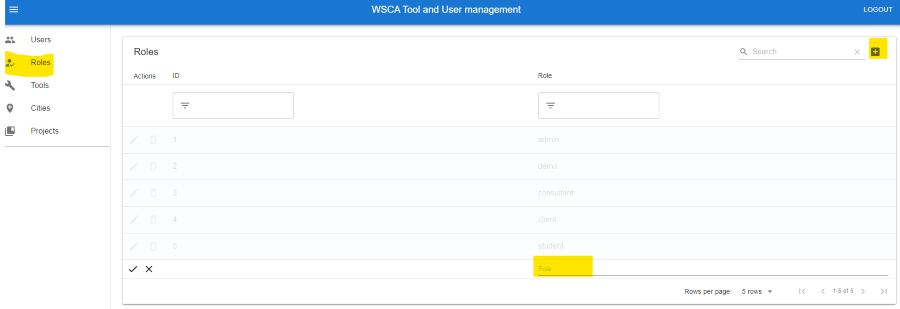
Roles are a way to determine a user’s permissions in a project. The most common roles have been predefined, but you can also create custom roles. Note that the roles need to be supported by the tool you are granting access to.
Predefined Roles
-   **Admin**: can do everything.
-   **Demo**: can view the tool's results but not edit them.
-   **Consultant**: can view and edit the tool's results.
-   **Client**: can view the tool's results but not edit them.
-   **Student**: can view and edit the tool's results.
Create a Custom Role
Click on the “Roles” tab.
Click on the “Add” button next to the search field in the top right corner.
Fill in the required fields and click on the “tick” button to create the role. Note that the role name needs to be unique.
WSC-Index Roles
The WSC-Index tool has a number of different roles. The following table shows the roles and their permissions.
Role |
Can view goals |
Can view indicator score |
Can view justification |
Can edit score and justification |
|---|---|---|---|---|
Admin |
Yes |
Yes |
Yes |
Yes |
Demo |
Yes |
Yes |
Yes |
Yes |
Consultant |
Yes |
Yes |
Yes1 / No |
Yes1 / No |
Client |
Yes |
Yes1 / No |
Yes1 / No |
No |
1 If the user is the owner of the city