Projects
A project is the main unit of access management in the WSCU. A project is a collection of users and tools. Projects might also be associated with a location, such as a city or a region. This allows you to give access to a user for a specific location. For instance, you can give a user access to the WSC-Index tool for the City of Melbourne but not for the City of Sydney.
A number of projects are already created in the WSCU. These projects are used to manage access to the WSC-Index tool, TDF, and Management Actions Tool. You can use these projects to give users access to the supported tools.
Create a New Project
You can also create your own projects. This allows you to give access to a group of users to a specific tool.
To create a new project:
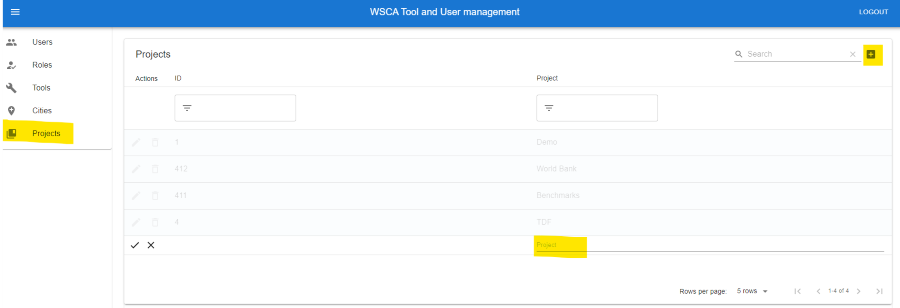
Click on the “Projects” tab and
Cick on the “Add” button in the top right corner next to the search field
Fill in the required fields and click on the “tick” button to create the project.
Adding Users, Tools, Cities, and Roles to a Project
A project can be associated with multiple users, tools, roles, and cities. This allows you to give specific groups of users access to certain tools and locations.
You can assign specific roles to users or user groups within a project. The role determines the level of access the user or group will have to the project. If a user is assigned multiple roles, the tool will typically grant access based on the highest role assigned. For example, if a user is assigned both the “Client” and “Consultant” roles, they will be given access to the project as a “Consultant”.
You can also add multiple tools to a project, which allows you to give certain groups of users access to those specific tools.
Additionally, you can add multiple cities or city groups to a project. However, this is optional, and not all tools support city-based access control. In the case of the WSC-Index tool, cities are used for location-based access control. If a new city is added to a project, a new WSC-Index assessment will be created for that city.
To add users, tools, cities, and roles to a project:
Click on the “Projects” tab and
Navigate to the “Project User List” section
Click on the “Add” button in the top right corner next to the search field
Fill in the required fields
Click on the “tick” button to save the changes.

Edit User access to a Project
To edit a user’s access to a project, you need to remove the user from the project and then add them back with the required access level.